ChemDraft app icon

CD

ChemDraft

A lightweight, open-source chemical drawing app for macOS and Windows. It is built around local files and a plugin architecture, with drawing, layout, export, and chemistry tools kept in clear boundaries.

Found a bug? Report it from inside the app: Help ▸ Report a Bug…

Download for macOS

Apple Silicon Macs

Download for Windows

64-bit Windows

1.0

New in 1.0

  • Document tabs. Keep several drawings open as tabs in one window.
  • Movable dialog windows. Export and Custom Page Size open in their own windows you can move anywhere, including another monitor.
  • Export preview. Turn on a live preview with size presets in Settings ▸ Export preview and size presets.
  • Abbreviation labels. Labels such as OMe count toward formula and mass and export correctly.
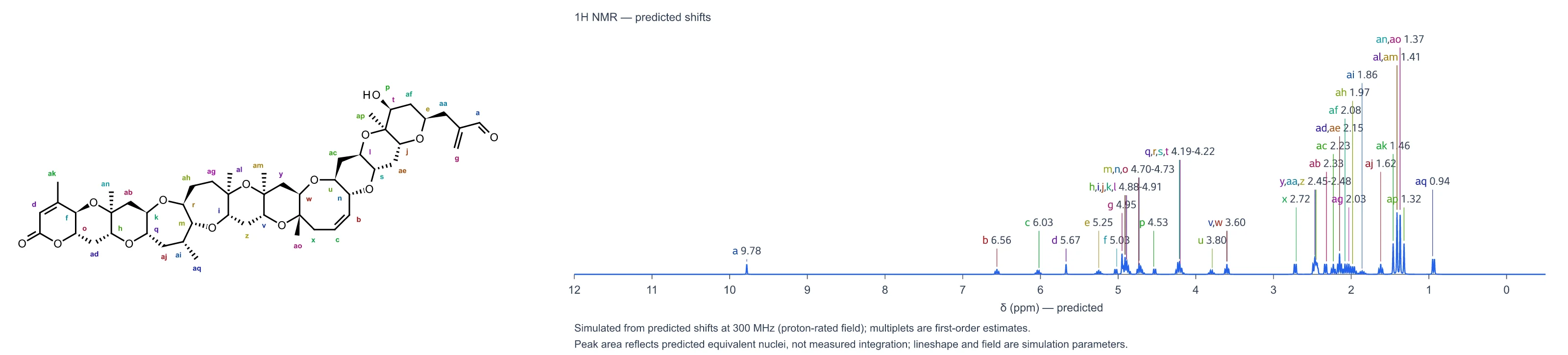
  • NMR on Windows. The NMR predictor plugin now works on Windows too.
See all changes

Assistants

Use ChemDraft from your AI assistant.

ChemDraft ships a free agent skill, in the open Agent Skills format, that teaches AI assistants (Claude Code, Claude Desktop with the MCP server, and Codex) to use ChemDraft’s own tools instead of drawing molecules by hand or quoting chemistry numbers from memory.

Examples

What it can do

  • Draw. Structures and reaction schemes as images for documents, exams, slides and handouts, including multiple-choice structure grids.
  • Name to structure. Convert chemical names to structures.
  • Stereochemistry. Answer R/S and E/Z questions.
  • Properties. Formula, exact and average mass, m/z, isotope patterns, logP, TPSA and estimated pKa.
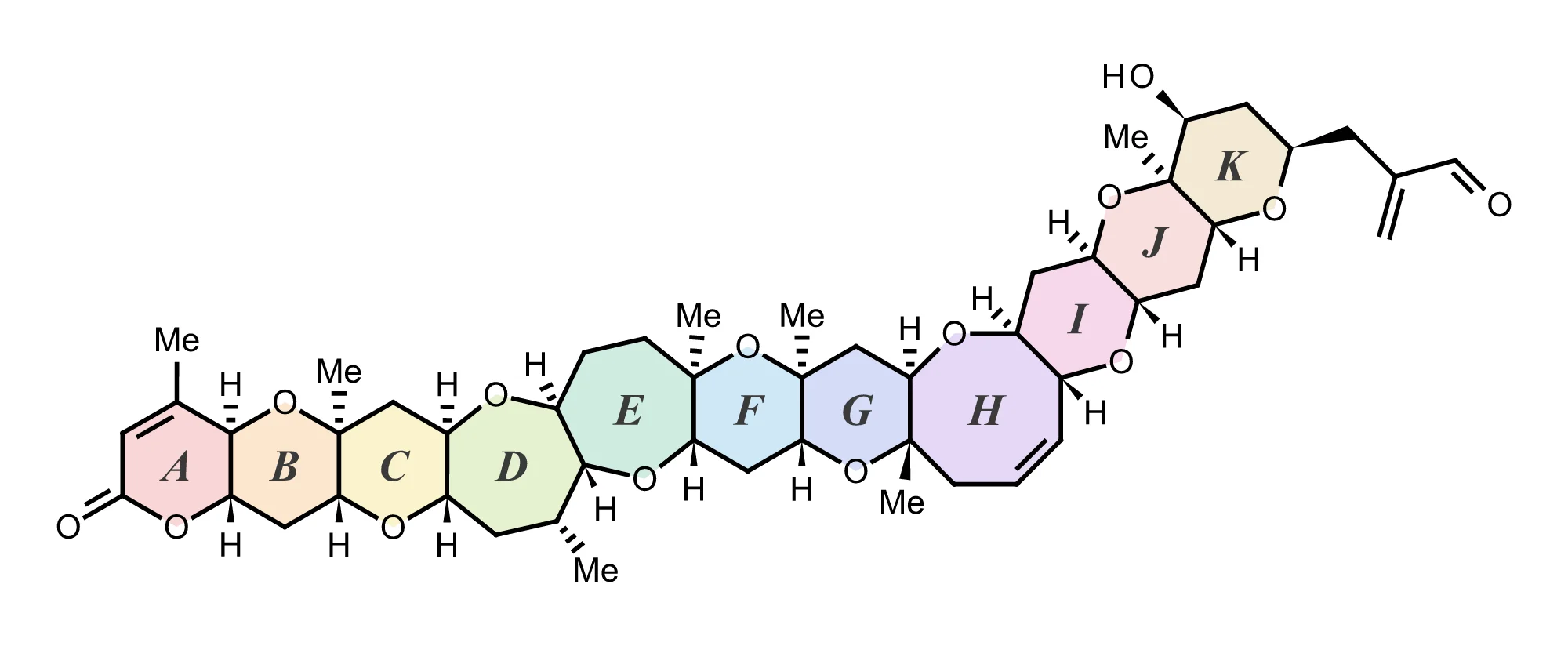
  • NMR estimates. Predict ¹H and ¹³C shift estimates with the NMR plugin, a separate download you install and mark as trusted (see the setup guide).
  • Export. CDXML, SDF, MOL, PDF and SMILES.
  • Styled figures. Coloured or shaded rings, highlighted substructures, colour-coded atoms, hand-sketched looks, arrows and annotations.

How it connects

A local MCP server (chemdraft-mcp) and a headless command-line tool (chemdraft) with machine-readable output. They call the same document code the desktop app uses, so the drawing an assistant makes and the one on the canvas come from one implementation. Everything runs on your computer.

Requirements. The skill, MCP server and command-line tool run from a copy of the source code, not from the downloaded app. Setup needs Git, Node 24 and pnpm 10.12.1 on macOS or Windows, plus a Java Development Kit (JDK) for name-to-structure conversion.

For example, to register the server with Claude Code (<checkout> is the folder you cloned into):

claude mcp add --scope user chemdraft -- pnpm -s --dir "<checkout>" chemdraft-mcp

Setup guide · Skill folder

Features

What ChemDraft does.

Every image below is the real app with real chemistry, not a mockup. The pKa screenshot and the Spin 3D recording come from the Mac app; the other two come from its browser preview build, which runs the same drawing and analysis code.
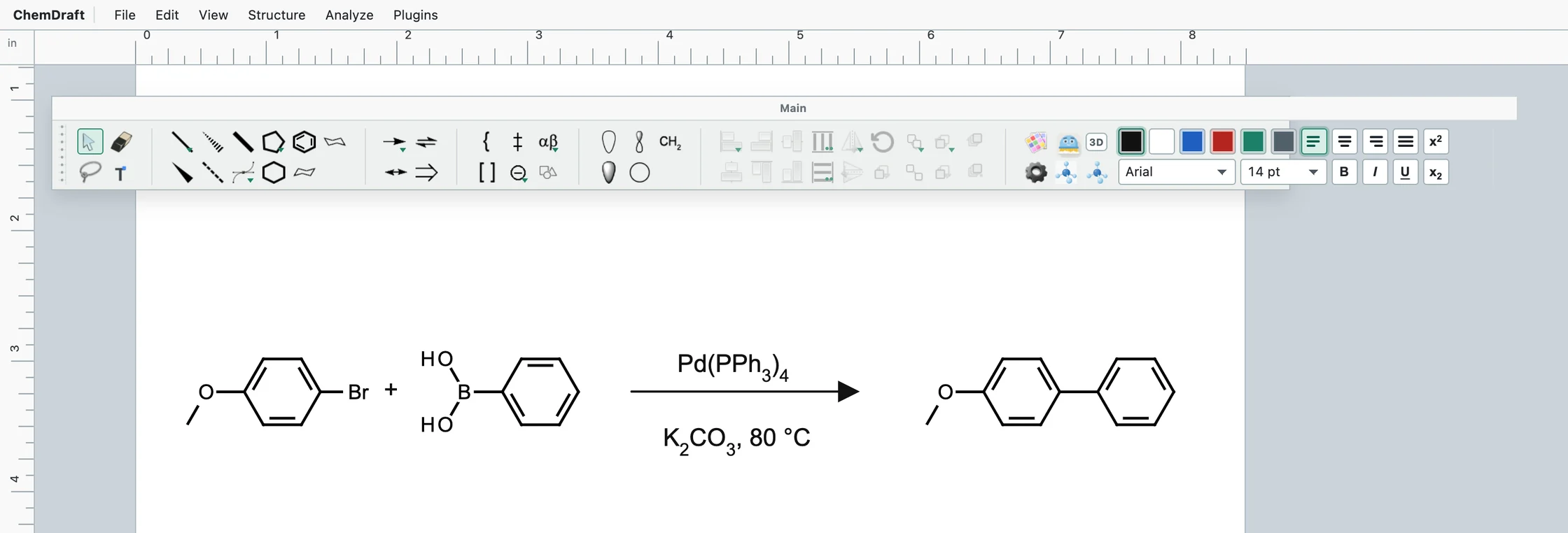
ChemDraft window with the Main toolbar above a letter-size page showing a Suzuki coupling: 4-bromoanisole plus phenylboronic acid, a reaction arrow labelled Pd(PPh3)4 above and K2CO3, 80 °C below with subscripts, giving 4-methoxybiphenyl.
A Suzuki coupling. The three structures were pasted as SMILES; the reagent labels were typed and set as formula text.

01 Draw

  • Paste SMILES, get structures. One SMILES lands where your pointer is, and a pasted list is laid out as a grid of editable molecules.
  • Document tabs. Keep several drawings open as tabs in one window.
  • Movable dialog windows. Export and Custom Page Size open in their own windows you can move anywhere, including another monitor.
  • Hover hotkeys. Point at an atom or bond and press a number to attach or fuse a ring, sprout a wedge, or add a carbonyl.
  • Reaction arrows that mean something. Reaction, equilibrium, resonance, retrosynthesis and no-reaction arrows, with reagent text that subscripts formulas for you.
  • Toolbars your way. Rearrange the tool palettes, build your own toolsets, and customize the Main toolbar in place.
Diclofenac selected on the page beside the Molecular Inspector, open to Mass Spec: a list of ion m/z values such as [M+H]+ 296.0240 and a stick plot of the theoretical isotope envelope with peaks at 295.0167, 296.0200 and 297.0137. The footer names the RDKit and IsoSpec builds with their SHA-256 fingerprints.
The Molecular Inspector on diclofenac. The two chlorines show up as the tall M+2 peak in the isotope envelope.

02 Inspect

  • About sixty properties, offline. Formula, average and monoisotopic mass, InChI and InChIKey, descriptors and predicted properties, all computed by RDKit running inside the app.
  • Isotope envelopes and ion m/z. The theoretical isotope pattern (from IsoSpec) and common adduct m/z values for the structure you drew.
  • Every number shows where it came from. A Provenance section names each method, engine version and fingerprint, and Copy as Markdown carries that record along with the numbers.
  • It says what it did not compute. Analyses that do not apply to your structure are listed as declined or not computed, so a missing number is never silent.
  • Your structure, as drawn. Results describe exactly what is on the page; a salt-stripped or neutralized form is a separate, named interpretation you choose.
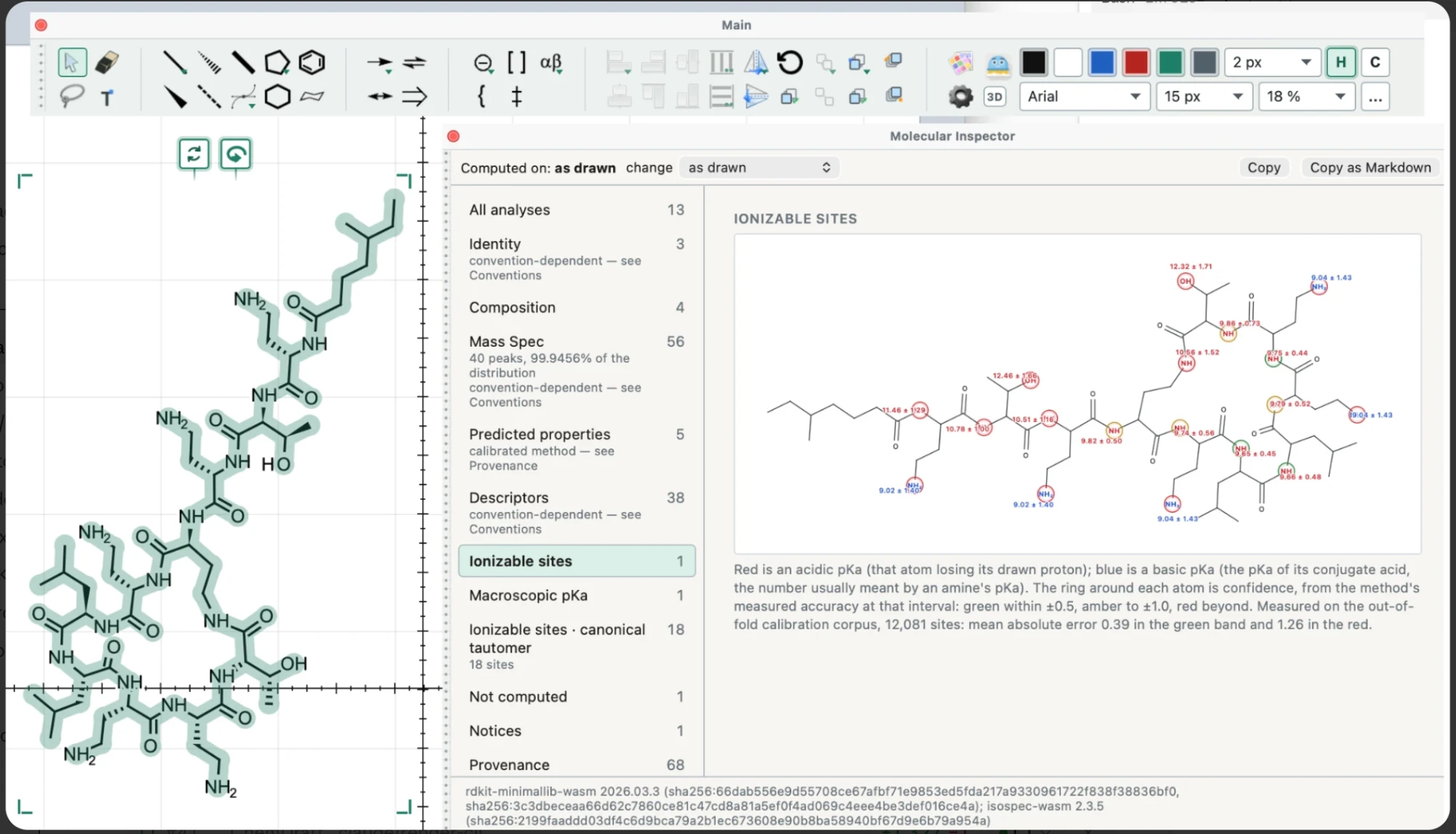
The ChemDraft Mac app with a large lipopeptide selected on the page beside the Molecular Inspector, open to Ionizable sites: the structure is redrawn with a ring on every acidic and basic atom, each labelled with its estimated pKa and uncertainty, ring colour showing confidence. The footer names the RDKit and IsoSpec builds with their SHA-256 fingerprints.
Ionizable sites on a large lipopeptide in the Mac app: an estimated pKa on every acidic (red) and basic (blue) atom, with a confidence ring.

03 Predict

  • pKa, built in. Estimated pKa values and the charge-state mix at pH 7.4, from a model trained for ChemDraft and combined across protonation microstates.
  • Site by site. The Ionizable sites view shows the per-atom values that the macroscopic numbers are built from.
  • NMR prediction as a plugin. The free NMR predictor plugin gives estimated ¹H and ¹³C shifts from NMRShiftDB2-derived statistics; its ¹H multiplicities are first-order estimates, not measurements.
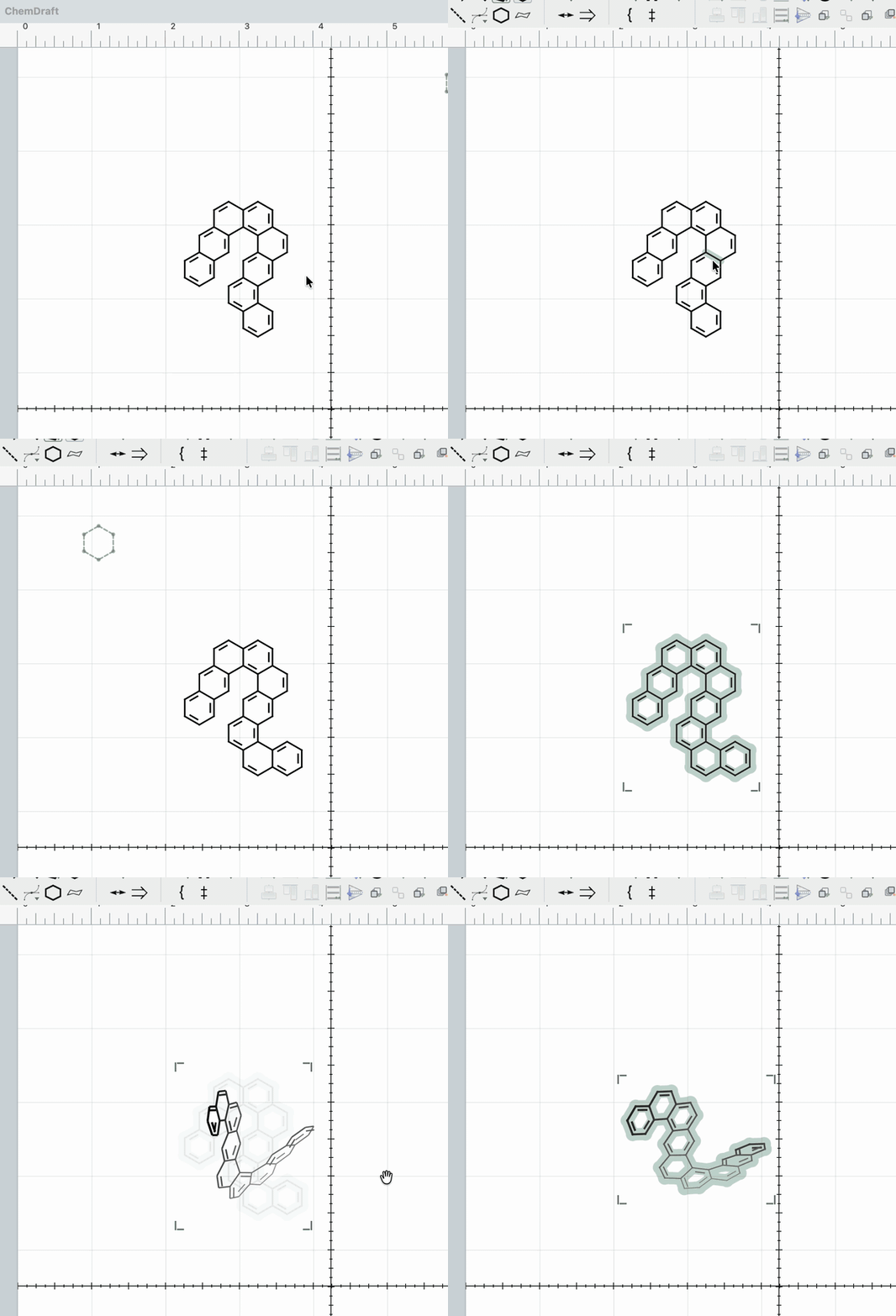
Animated recording of Spin 3D in the ChemDraft Mac app: a flat drawing of a helicene is selected and turned, and the fused rings twist out of the page into a helix.
Spin 3D in the Mac app, turning a helicene out of the page.

04 Spin 3D

  • From flat to 3D and back. Spin 3D builds a real 3D conformer with RDKit, lets you turn it with the mouse, and flattens the view you pick back onto the page.
  • Depth you can read. Bonds nearer to you draw darker and thicker, so the shape still reads in a flat figure.
  • Force-field cleanup. Selectable refinement modes trade speed for how much strain is relaxed.

05 Open

  • Free and open source. The app is Apache-2.0, and the full source and history are on GitHub.
  • Local files, no account. Documents are files on your computer, and there is nothing to sign in to.
  • Plugins with permissions. Each plugin declares what it may touch, bundled analyzers run in their own worker, and packages install from a file through the Plugin Manager.
  • Formats in and out. Opens ChemDraft documents and CDXML; exports SVG, PDF, PNG, JPEG, BMP, GIF, TIFF, CDXML, SDF and SMILES; copies SMILES, InChI, InChIKey, MOL and CDXML; optional live export preview offers size presets.
  • Updates in the app. Signed app updates are offered from inside ChemDraft, and the NMR plugin gets its updates in the app too.
Platform
Apple Silicon Macs (arm64) and 64-bit Windows (x64).
Package
DMG for macOS and a setup .exe installer for Windows, both from the latest GitHub release.
Trust
macOS builds are Developer ID signed and notarized by Apple, so they open without Gatekeeper warnings. The Windows installer is not code-signed yet, so Windows SmartScreen may show “Windows protected your PC”: choose “More info”, then “Run anyway”.
Updates
Updates are offered inside the app. On macOS, built-in Sparkle updates check the signed appcast. On Windows, the built-in updater downloads signed update packages.
License
Apache-2.0

About

Drawing first, without a large platform around it.

ChemDraft is early software, but its desktop app already centers the drawing workspace: bonds, chains, atom labels, rings, brackets, arrows, page layout, and a selected-molecule editor. Its plugin system is there for work that does not need to become part of the drawing core.

Support

The source is the support record.

If something does not work, use Help ▸ Report a Bug… inside the app. If you open an issue on GitHub instead, include the app version, your operating system version (macOS or Windows), and the steps that reproduce it. The release page is also the place to find prior builds and notes.

  1. Report an issue on GitHub.
  2. Browse all releases.
  3. Read the source and project notes.